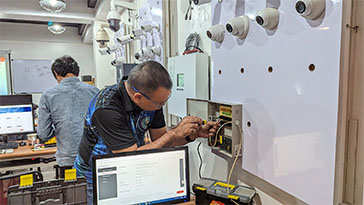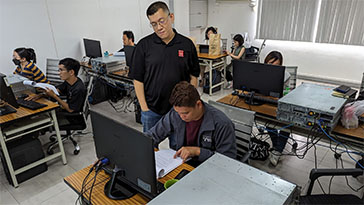
If you are looking for a Microsoft Windows Server Training in the Philippines that goes beyond theory and simulations, Inventive Media offers in-person, hands-on classes for Windows Server Administration and Active Directory training real physical servers. To further improve learning outcomes, we have added new enterprise rack-mount servers to our lab, giving trainees more hands-on time, better performance, and a more realistic enterprise environment.
Why Choose Our Windows Server Training Philippines Program
Newly Added Servers for Improved Hands-On Labs
To strengthen our reputation as a provider of practical Windows Server Training Philippines, we recently expanded our server lab by adding new physical servers. This upgrade allows:
- The only training center that provides one rack-mount server per student
- Pearson Vue Accredited Testing Center
- PhilGEPS Accredited Center
- Globally Recognized Course Certificate
Our lab now consists of multiple enterprise rack-mount servers, enabling each participant to install, configure, troubleshoot, and manage Windows Server in a real hardware environment.
Enhancing Training Modules with Windows Server 2022
With Windows Server 2022, Microsoft has introduced several advanced features aimed at improving security, performance, and scalability. These include:
- Advanced Multi-layer Security: Trainees can explore the enhanced security features such as secured-core server and hardware root-of-trust, which are pivotal in today’s cyber-threat landscape.
- Hybrid Capabilities with Azure: The integration with Azure services provides a seamless hybrid experience. Participants will learn to configure and manage hybrid environments effectively, which are becoming increasingly common in enterprise settings.
- Improved Storage and Networking Technologies: Windows Server 2022 includes enhancements like Storage Spaces Direct, Azure Stack HCI, and improvements in networking technologies such as faster Ethernet and software-defined networking.
Incorporating the Dell Rack Servers will provide practical insights into deploying, managing, and optimizing Windows Server 2022, giving trainees firsthand experience that builds both knowledge and confidence.
Practical Simulation and Realistic Training Environments
Our decision to include Dell servers alongside HP and IBM models in our training setups is driven by a commitment to offer a realistic simulation environment. Each server brand and model comes with its unique set of features, management tools, and configuration idiosyncrasies. By training across different hardware, IT professionals gain a versatile skill set that prepares them for various industry demands.
For instance, trainees will practice installing and configuring Windows Server 2022 across different server brands, compare the performance metrics, and analyze the impact of server architecture on operating system efficiency and application performance. Additionally, troubleshooting hardware-specific and software-related issues across different platforms will enhance their problem-solving skills dramatically.
Curriculum Integration and Industry Relevance
The updated curriculum not only covers theoretical aspects but also includes substantial practical exposure, with scenarios and case studies drawn from real-world business challenges. This approach ensures that the skills learned are applicable and relevant.
Moreover, by using industry-standard hardware such as Dell Rack Servers, our training facility remains at the forefront of technology education, making our certification programs highly valued by employers. IT professionals trained on the latest and diverse technologies are better prepared to enter a dynamic workforce and contribute effectively from day one.
MS Windows Server 2022
Master your server: Install, Administer and Manage!
In-Person | Physical
2 Days | 20+ Hours
Basic to Advance
Unlimited Retakes
- Understand the features and capabilities of Windows Server 2022.
- Learn how to install and configure Windows Server 2022.
- Manage server roles and features effectively.
- Implement and manage Active Directory Domain Services (AD DS).
- Configure network services such as DNS, DHCP, and VPN.
- Implement and manage Group Policy Objects (GPOs) for centralized management.
- Ensure server security and implement best practices for securing server environments.
- Monitor server performance and troubleshoot common issues.
- Implement data storage solutions including File Services and Storage Spaces.
- Learn about virtualization with Hyper-V and containers.
- Basic Computer knowledge and Skills in PC or Mac.
- Basic knowledge in computer hardware and software
- Should be proficient in Basic Networking Wired and Wireless
- Certificate of course completion
- Training references (PDF)
- Exercise materials
- Some add-ons
- Free trainer consultation
- Unlimited Free Retakes
Unlimited Retakes = Unlimited Hours of Learning!
We understand that individuals have different learning styles and paces, that’s why we offer the opportunity to learn at your own speed. If you need more time to grasp a concept, you are welcome to come back and retake the class at no additional cost. We believe in providing students with the support they need to succeed.
To Avail: Finish the course to qualify for the unlimited refresher classes
Validity: 1 Year
MS Windows Server 2022
Managing user accounts and implementing group policies
In-Person | Physical
2 Days | 20+ Hours
Basic to Advance
Unlimited Retakes
- Understand the role and importance of Active Directory in Windows Server environments.
- Learn to install and configure Active Directory Domain Services (AD DS) in Windows Server 2022.
- Master the management of users, groups, and computers within Active Directory.
- Explore Group Policy management for centralized configuration and security settings.
- Gain proficiency in Active Directory replication and troubleshooting techniques.
- Learn about Active Directory Certificate Services (AD CS) and its integration with Windows Server 2022.
- Understand Active Directory Federation Services (AD FS) for single sign-on (SSO) capabilities.
- Explore Active Directory Lightweight Directory Services (AD LDS) for directory-enabled applications.
- Develop skills in Active Directory Rights Management Services (AD RMS) for data protection.
- Gain knowledge of Active Directory Domain Trusts and their implementation.
- Basic Computer knowledge and Skills in PC or Mac.
- Basic knowledge in computer hardware and software
- Should be proficient in Networking Essentials both Wired and Wireless
- Should have completed Microsoft Windows Server 2022 Administration Course
- Certificate of course completion
- Training references (PDF)
- Exercise materials
- Some add-ons
- Free trainer consultation
- Unlimited Free Retakes
Unlimited Retakes = Unlimited Hours of Learning!
We understand that individuals have different learning styles and paces, that’s why we offer the opportunity to learn at your own speed. If you need more time to grasp a concept, you are welcome to come back and retake the class at no additional cost. We believe in providing students with the support they need to succeed.
To Avail: Finish the course to qualify for the unlimited refresher classes
Validity: 1 Year